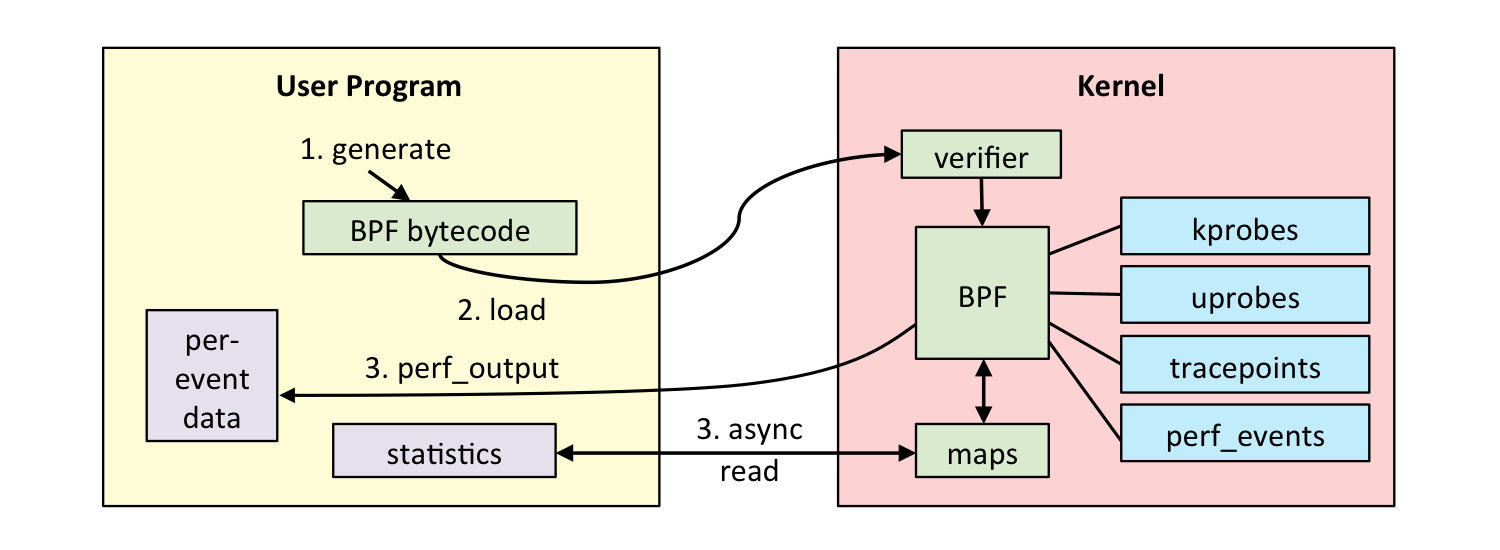
eBPF(extended Berkeley Packet Filter),ebpf 支持程序在不修改内核源码,或添加额外内核模块情况下运行,添加内核新功能。
架构
用户态
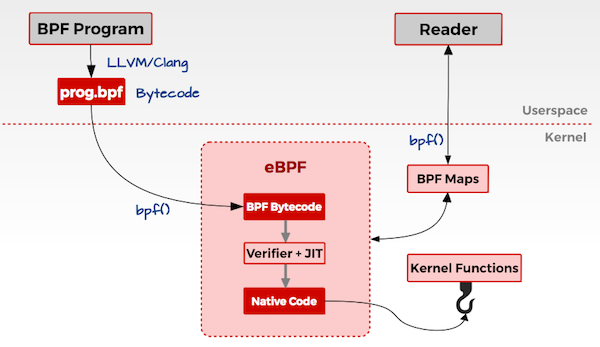
用户编写 ebpf 程序,可使用 ebpf 汇编或者 ebpf 特有 c 语言编写;
使用 llvm/clang 编译器,将 ebpf 程序编译为 ebpf 字节码;
调用 bpf() 系统调用将 eBPF 字节码加载到内核
内核态
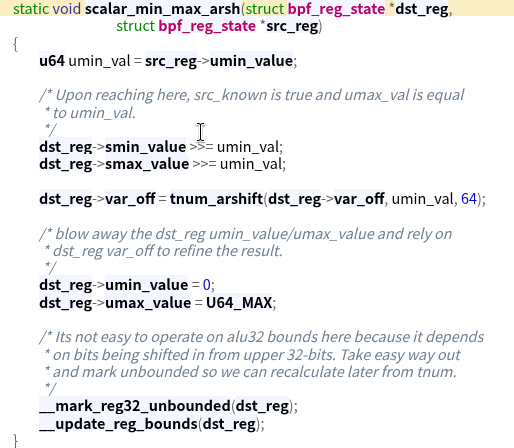
ebpf 字节码到内核时,内核会先对其进行安全验证;
使用 JIT (Just In Time)将 字节码编译为本地机器码;
根据 eBPF 程序功能,将机器码挂载到内核的不同运行路径上(例如跟踪内核运行状态的ebpf 程序会挂载在 kprobes 的运行路径上)。当内核运行到这些路径上,就会触发执行相应路径上的 eBPF 机器码;
原文拿来和 JAVA 的 AOP 概念做类比,这里由于本人没有 java 基础,所以不再赘述,感觉只是挂钩函数功能而已,欢迎评论区指正 orz…
根据挂载点功能不同,可以分为以下几个模块:
eBPF 使用 编写 eBPF 程序方式有直接汇编,c语言形式,bcc 工具。
bpftrace 下面是一些简单命令用来入门了解,详细文档参考 bpftrace language
One-Liner Tutorial Lesson 1. Listing Probes 1 bpftrace -l 'tracepoints:syscalls:sys_enter_*'
bpftrace -l 列举所有 probes,然后跟一个搜索字段
Lesson 2. Hello World 1 bpftrace -e 'BEGIN { printf("hello world\n"); }'
BEGIN 特殊 probe ,在程序开始时运行,可以用来设置变量以及打印头信息;
action {} ,这里调用了 printf 函数
Lesson 3. File Opens 1 2 3 4 5 6 7 # bpftrace -e 'tracepoint:syscalls:sys_enter_openat { printf("%s %s\n", comm, str(args.filename)); }' Attaching 1 probe... snmp-pass /proc/cpuinfo snmp-pass /proc/stat snmpd /proc/net/dev snmpd /proc/net/if_inet6 ^C
Lesson 4. Syscall Counts By Process 1 2 3 4 5 6 7 8 bpftrace -e 'tracepoint:raw_syscalls:sys_enter { @[comm] = count(); }' Attaching 1 probe... ^C @[bpftrace]: 6 @[systemd]: 24 @[snmp-pass]: 96 @[sshd]: 125
总结进程进行系统调用的次数
@:表示 map 特殊变量类型,可以存储总结数据。可以使用 @name 提高可读性;
[]:key
count():map 类型调用次数计数
Lesson 5. Distributino of read() Bytes 1 2 3 4 5 6 7 8 9 10 11 12 13 # bpftrace -e 'tracepoint:syscalls:sys_exit_read /pid == 18644/ { @bytes = hist(args.ret); }' Attaching 1 probe... ^C @bytes: [0, 1] 12 |@@@@@@@@@@@@@@@@@@@@ | [2, 4) 18 |@@@@@@@@@@@@@@@@@@@@@@@@@@@@@@@ | [4, 8) 0 | | [8, 16) 0 | | [16, 32) 0 | | [32, 64) 30 |@@@@@@@@@@@@@@@@@@@@@@@@@@@@@@@@@@@@@@@@@@@@@@@@@@@@| [64, 128) 19 |@@@@@@@@@@@@@@@@@@@@@@@@@@@@@@@@ | [128, 256) 1 |@
总结 sys_read() 内核函数的返回值并以直方图格式返回
/…/:过滤
ret:函数返回值
@:map 无key
hist:map 函数
Lesson 6. Kernel Dynamic Tracing of read() Bytes 1 2 3 4 5 6 7 8 9 10 11 12 13 14 15 16 17 # bpftrace -e 'kretprobe:vfs_read { @bytes = lhist(retval, 0, 2000, 200); }' Attaching 1 probe... ^C @bytes: (...,0] 0 | | [0, 200) 66 |@@@@@@@@@@@@@@@@@@@@@@@@@@@@@@@@@@@@@@@@@@@@@@@@@@@@| [200, 400) 2 |@ | [400, 600) 3 |@@ | [600, 800) 0 | | [800, 1000) 5 |@@@ | [1000, 1200) 0 | | [1200, 1400) 0 | | [1400, 1600) 0 | | [1600, 1800) 0 | | [1800, 2000) 0 | | [2000,...) 39 |@@@@@@@@@@@@@@@@@@@@@@@@@@@@@@ |
probe 采用 kretprobe:vfs_read
Lesson 7. Timing read()s 1 2 3 4 5 6 7 8 9 10 11 12 13 14 15 16 17 18 19 20 21 22 23 24 25 26 # bpftrace -e 'kprobe:vfs_read { @start[tid] = nsecs; } kretprobe:vfs_read /@start[tid]/ { @ns[comm] = hist(nsecs - @start[tid]); delete(@start, tid); }' Attaching 2 probes... [...] @ns[snmp-pass]: [0, 1] 0 | | [2, 4) 0 | | [4, 8) 0 | | [8, 16) 0 | | [16, 32) 0 | | [32, 64) 0 | | [64, 128) 0 | | [128, 256) 0 | | [256, 512) 27 |@@@@@@@@@ | [512, 1k) 125 |@@@@@@@@@@@@@@@@@@@@@@@@@@@@@@@@@@@@@@@@@@@@@ | [1k, 2k) 22 |@@@@@@@ | [2k, 4k) 1 | | [4k, 8k) 10 |@@@ | [8k, 16k) 1 | | [16k, 32k) 3 |@ | [32k, 64k) 144 |@@@@@@@@@@@@@@@@@@@@@@@@@@@@@@@@@@@@@@@@@@@@@@@@@@@@| [64k, 128k) 7 |@@ | [128k, 256k) 28 |@@@@@@@@@@ | [256k, 512k) 2 | | [512k, 1M) 3 |@ | [1M, 2M) 1 | |
总结消耗在 read() 上的 时间。
Lesson 8. Count Process-Level Events 1 2 3 4 5 6 7 8 9 10 11 12 13 # bpftrace -e 'tracepoint:sched:sched* { @[probe] = count(); } interval:s:5 { exit(); }' Attaching 25 probes... @[tracepoint:sched:sched_wakeup_new]: 1 @[tracepoint:sched:sched_process_fork]: 1 @[tracepoint:sched:sched_process_exec]: 1 @[tracepoint:sched:sched_process_exit]: 1 @[tracepoint:sched:sched_process_free]: 2 @[tracepoint:sched:sched_process_wait]: 7 @[tracepoint:sched:sched_wake_idle_without_ipi]: 53 @[tracepoint:sched:sched_stat_runtime]: 212 @[tracepoint:sched:sched_wakeup]: 253 @[tracepoint:sched:sched_waking]: 253 @[tracepoint:sched:sched_switch]: 510
sched:sched 类型 probe
probe:当前 probe 全名
intervals:s:5:持续5s
exit():退出bpftrace
Lesson 9. Profile On-CPU Kernel Stacks 1 2 3 4 5 6 7 8 9 10 11 12 13 14 15 16 17 18 19 20 # bpftrace -e 'profile:hz:99 { @[kstack] = count(); }' Attaching 1 probe... ^C [...] @[ filemap_map_pages+181 __handle_mm_fault+2905 handle_mm_fault+250 __do_page_fault+599 async_page_fault+69 ]: 12 [...] @[ cpuidle_enter_state+164 do_idle+390 cpu_startup_entry+111 start_secondary+423 secondary_startup_64+165 ]: 22122
profile:hz:99:设置cpu为99hz。需要足够的cpu时间来捕获执行,但又不能影响执行。100可能与lockstep或其他定时活动冲突,故选择99
kstack:内核函数调用栈
Lesson10. Scheduler Tracing 1 2 3 4 5 6 7 8 9 10 11 12 13 14 15 16 17 18 19 20 21 22 # bpftrace -e 'tracepoint:sched:sched_switch { @[kstack] = count(); }' ^C [...] @[ __schedule+697 __schedule+697 schedule+50 schedule_timeout+365 xfsaild+274 kthread+248 ret_from_fork+53 ]: 73 @[ __schedule+697 __schedule+697 schedule_idle+40 do_idle+356 cpu_startup_entry+111 start_secondary+423 secondary_startup_64+165 ]: 305
过滤了 上下文切换的 events。
Lesson 11. Block I/O Tracing 1 2 3 4 5 6 7 8 9 10 11 12 13 14 15 16 17 18 19 20 21 22 23 24 # bpftrace -e 'tracepoint:block:block_rq_issue { @ = hist(args.bytes); }' Attaching 1 probe... ^C @: [0, 1] 1 |@@ | [2, 4) 0 | | [4, 8) 0 | | [8, 16) 0 | | [16, 32) 0 | | [32, 64) 0 | | [64, 128) 0 | | [128, 256) 0 | | [256, 512) 0 | | [512, 1K) 0 | | [1K, 2K) 0 | | [2K, 4K) 0 | | [4K, 8K) 24 |@@@@@@@@@@@@@@@@@@@@@@@@@@@@@@@@@@@@@@@@@@@@@@@@@@@@| [8K, 16K) 2 |@@@@ | [16K, 32K) 6 |@@@@@@@@@@@@@ | [32K, 64K) 5 |@@@@@@@@@@ | [64K, 128K) 0 | | [128K, 256K) 1 |@@ |
块设备 I/O 请求
tracepoint:block:block类型的 tracepoint
block_rq_issue:当设备存在 I/O 时触发
args.bytes:block_rq_issue 的参数,请求的字节大小
Lesson 12. Kernel Struct Tracing 1 2 3 4 5 6 7 8 9 10 11 12 13 14 15 16 17 # cat path.bt# ifndef BPFTRACE_HAVE_BTF # include <linux/path.h> # include <linux/dcache.h> # endif kprobe:vfs_open { printf("open path: %s\n", str(((struct path *)arg0)->dentry->d_name.name)); } # bpftrace path.bt Attaching 1 probe... open path: dev open path: if_inet6 open path: retrans_time_ms [...]
跟踪了 vfs_open() 内核函数,并解析其 第一个参数 struct path *。
kprobe
arg0:自带变量,表示第一个参数
((struct path *)arg0)->dentry->d_name.name:将 arg0 转换为 struct path 类型。
#include 包含含有 struct path 定义的文件。
bcc bcc 工具安装命令
1 sudo pacman -S bcc bcc-tools python-bcc
Lesson 1. hello world 运行以下 hello world python 程序
1 2 3 4 5 6 7 8 9 10 11 12 13 14 15 16 17 18 from bcc import BPFprog = """ int hello(void *ctx) { bpf_trace_printk("Hello, World!\\n"); return 0; } """ b = BPF(text=prog) b.attach_kprobe(event="__x64_sys_clone" , fn_name="hello" ) b.trace_print()
text='...':定义了 BPF 程序。c语言;
kprobe__sys_clone():基于 kprobes,如果函数定义前缀为 kprobe__,剩下的则被认为是要插桩的内核函数,(上例中没有用到,因为较新内核中clone为__x64_sys_clone,而其会自动修正为sys_clone导致报错)
void *ctx:ctx 保存了 参数,但是由于这里没有使用,直接转换为 void 类型;
bpf_trace_printk():内核打印函数,基于trace_pipe。但本身参数存在限制,最多3个参数,只能有一个%s,并且 trace_pipe全局共享。更好的调用接口是BPF_PERF_OUTPUT。
return 0:必要的格式,并且 内核内部对不同返回值有不同处理逻辑,未定义会导致UB行为
.trace_print:bcc 例程读取 trace_pipe 并打印输出
Lesson 2. sys_sync() 仿照前面 hello world 编写即可
1 2 3 4 5 6 7 8 9 10 11 12 13 from bcc import BPFprog = """ int kprobe__ksys_sync(void *ctx) { bpf_trace_printk("sys_sync() called\\n"); return 0; } """ print ("Tracing sys_sync()... Ctrl-C to end" )b = BPF(text=prog).trace_print()
Lesson 3. hello_fields.py 1 2 3 4 5 6 7 8 9 10 11 12 13 14 15 16 17 18 19 20 21 22 23 24 25 26 27 28 from bcc import BPFfrom bcc.utils import printbprog = """ int hello(void *ctx){ bpf_trace_printk("Hello, World!\\n"); return 0; } """ b = BPF(text=prog) b.attach_kprobe(event="__x64_sys_clone" , fn_name="hello" ) print ("%-18s %-16s %-6s %s" % ("TIME(S)" , "COMM" , "PID" , "MESSAGE" ))while 1 : try : (task, pid, cpu, flags, ts, msg) = b.trace_fields() except ValueError: continue except KeyboardInterrupt: exit() printb(b"%-18.9f %-16s %-6d %s" % (ts, task, pid, msg))
trace 与 hello_world 类似,但加了一些新东西:
prog = :定义 c 程序为 prog 变量
hello():使用自定义函数名,而非kprobe__。BPF c 程序中的所有 c 函数会在 probe 中执行,因此他们会将 pt_reg* ctx 作为第一个参数。如果不需要执行,需要定义为static inline,有时候需要__always_inline属性。
b.attach_kprobe(event="__x64_sys_clone", fn_name="hello"):创建一个 kprobe。可以多次 attach_kprobe,也可以将一个 c 函数 attach 到多个内核函数中。
b.trace_fields:返回 trace_pipe 中的固定字段集合。类似于 trace_print()。
Lesson 4. sync_timing.py
过去 sync 实现是异步的,导致 系统管理员会连敲三个sync命令等待完成,再 reboot,有人sync; sync; sync 这个不会等待直接执行,自然起不到等待sync的作用。现在 sync 是同步实现,会阻塞(不过运行很快)。
sync_timing.py 实现了 trace sync 并检测命令间隔运行是否超过 1s。
1 2 3 4 5 6 7 8 9 10 11 12 13 14 15 16 17 18 19 20 21 22 23 24 25 26 27 28 29 30 31 32 33 34 35 36 37 38 39 40 41 42 43 44 45 46 47 48 from __future__ import print_functionfrom bcc import BPFfrom bcc.utils import printbb = BPF( text=""" #include <uapi/linux/ptrace.h> BPF_HASH(last); int do_trace(struct pt_regs *ctx) { u64 ts, *tsp, delta, key = 0; // attempt to read stored timestamp tsp = last.lookup(&key); if (tsp != NULL) { delta = bpf_ktime_get_ns() - *tsp; if (delta < 1000000000) { // output if time is less than 1 second bpf_trace_printk("%d\\n", delta / 1000000); } last.delete(&key); } // update stored timestamp ts = bpf_ktime_get_ns(); last.update(&key, &ts); return 0; } """ ) b.attach_kprobe(event="ksys_sync" , fn_name="do_trace" ) print ("Tracing for quick sync's... Ctrl-C to end" )start = 0 while 1 : try : (task, pid, cpu, flags, ts, ms) = b.trace_fields() if start == 0 : start = ts ts = ts - start printb(b"At time %.2f s: multiple syncs detected, last %s ms ago" % (ts, ms)) except KeyboardInterrupt: exit()
bpf_ktime_get_ns():返回当前纳秒级时间戳
BPF_HASH(last):创建一个 BPF map 对象 (hash表)。默认 key value 类型为 u64。
key=0:这里只使用了 key = 0 的情况。
last.lookup(&key):在 hash 表中查询 key,如果存在返回指向该值的指针。否则为空。参数为 key 的指针地址
if (tsp != NULL) {:bpf 的 verifier 要求从 lookup 获取的指针变量必须检查是否为空。以防空指针引用
last.delete(&key):删除 key。这里先删除再update是由于 4.8.10 内核版本 update 函数存在 bug,新版本注释改行无影响
last.update(&key, &ts):修改 key 对应的 value。
Lesson 5. sync_count.py 修改 sync_timing.py,令其能够保存所有的 kernel sync 系统调用,以 hash map 结构存储
1 2 3 4 5 6 7 8 9 10 11 12 13 14 15 16 17 18 19 20 21 22 23 24 25 26 27 28 29 30 31 32 33 34 35 36 37 38 39 40 41 42 43 44 45 46 47 48 49 50 51 52 53 54 55 56 57 58 59 60 61 62 63 64 65 66 67 68 69 from __future__ import print_functionfrom bcc import BPFfrom bcc.utils import printbb = BPF( text=""" #include <uapi/linux/ptrace.h> BPF_ARRAY(idx, u64, 1); BPF_ARRAY(last_idx, u64, 1); BPF_HASH(last); int do_trace(struct pt_regs *ctx) { u64 ts, *tsp, delta, *idxp, idx_val, *last_idxp, last_idx_val = 0; int zero = 0; // read current idx & last_idx idxp = idx.lookup(&zero); if (!idxp) return 0; idx_val = *idxp; last_idxp = last_idx.lookup(&zero); if (!last_idxp) return 0; last_idx_val = *last_idxp; // attempt to read stored timestamp tsp = last.lookup(&last_idx_val); if (tsp != NULL) { delta = bpf_ktime_get_ns() - *tsp; if (delta < 1000000000) { // output if time is less than 1 second bpf_trace_printk("%d %d\\n", last_idx_val, delta / 1000000); } } // update stored timestamp ts = bpf_ktime_get_ns(); last.update(&idx_val, &ts); last_idx.update(&zero, &idx_val); idx_val++; idx.update(&zero, &idx_val); return 0; } """ ) b.attach_kprobe(event="ksys_sync" , fn_name="do_trace" ) print ("Tracing for quick sync's... Ctrl-C to end" )start = 0 while 1 : try : (task, pid, cpu, flags, ts, msg) = b.trace_fields() if start == 0 : start = ts ts = ts - start print (f"[Debug] msg: {msg} " ) key = msg.split(b" " )[0 ] ms = msg.split(b" " )[1 ] printb( b"At time %.2f s: multiple syncs detected, key %s, last %s ms ago" % (ts, key, ms) ) except KeyboardInterrupt: exit()
Lesson 6. disksnoop.py 1 2 3 4 5 6 7 8 9 10 11 12 13 14 15 16 17 18 19 20 21 22 23 24 25 26 27 28 29 30 31 32 33 34 35 36 37 38 39 40 41 42 43 44 45 46 47 48 49 50 51 52 53 54 55 56 57 58 59 60 61 62 63 64 65 66 67 68 69 70 71 72 73 74 75 76 77 78 79 80 81 82 83 from __future__ import print_functionfrom bcc import BPFfrom bcc.utils import printbREQ_WRITE = 1 b = BPF( text=""" #include <uapi/linux/ptrace.h> #include <linux/blk-mq.h> BPF_HASH(start, struct request *); void trace_start(struct pt_regs *ctx, struct request *req) { // stash start timestamp by request ptr u64 ts = bpf_ktime_get_ns(); start.update(&req, &ts); } void trace_completion(struct pt_regs *ctx, struct request *req) { u64 *tsp, delta; tsp = start.lookup(&req); if (tsp != 0) { delta = bpf_ktime_get_ns() - *tsp; bpf_trace_printk("%d %x %d\\n", req->__data_len, req->cmd_flags, delta / 1000); start.delete(&req); } } """ ) b.attach_kprobe(event="blk_mq_start_request" , fn_name="trace_start" ) b.attach_kprobe(event="blk_mq_end_request" , fn_name="trace_completion" ) print ("%-18s %-2s %-7s %8s" % ("TIME(s)" , "T" , "BYTES" , "LAT(ms)" ))while 1 : try : (task, pid, cpu, flags, ts, msg) = b.trace_fields() (bytes_s, bflags_s, us_s) = msg.split() if int (bflags_s, 16 ) & REQ_WRITE: type_s = b"W" elif bytes_s == "0" : type_s = b"M" else : type_s = b"R" ms = float (int (us_s, 10 )) / 1000 printb(b"%-18.9f %-2s %-7s %8.2f" % (ts, type_s, bytes_s, ms)) except KeyboardInterrupt: exit()
REQ_WRTIE:python中定义内核常量,用于后续比较;
trace_start(struct pt_regs *ctx, struct request *req):参数ctx用于寄存器以及 BPF 上下文,实际参数req,req为 attach 函数 blk_start_request 的实际参数。
start.update(&req, &ts):以 struct 结构体作为 key,常见的可以作为 key 的还有 thread id。
req->_data_len:可以解引用 struct request 的成员。bcc 是通过封装 bpf_probe_read_kernel 函数来实现的,也可以自行调用来实现。
if BPF.get_kprobe_functions(b'__blk_account_io_done'):...:根据 kernel 版本来选择不同 attach 的函数。
Lesson 7. hello_perf_output.py 使用 BPF_PERF_OUTPUT() 接口而不是 bpf_trace_printk。hello_perf_output.py
1 2 3 4 5 6 7 8 9 10 11 12 13 14 15 16 17 18 19 20 21 22 23 24 25 26 27 28 29 30 31 32 33 34 35 36 37 38 39 40 41 42 43 44 45 46 47 48 49 50 51 52 53 54 from bcc import BPFprog = """ #include <linux/sched.h> // define output data structure in C struct data_t { u32 pid; u64 ts; char comm[TASK_COMM_LEN]; }; BPF_PERF_OUTPUT(events); int hello(struct pt_regs *ctx) { struct data_t data = {}; data.pid = bpf_get_current_pid_tgid(); data.ts = bpf_ktime_get_ns(); bpf_get_current_comm(&data.comm, sizeof(data.comm)); events.perf_submit(ctx, &data, sizeof(data)); return 0; } """ b = BPF(text=prog) b.attach_kprobe(event="__x64_sys_clone" , fn_name="hello" ) print ("%-18s %-16s %-6s %s" % ("TIME(s)" , "COMM" , "PID" , "MESSAGE" ))start = 0 def print_event (cpu, data, size ): global start event = b["events" ].event(data) if start == 0 : start = event.ts time_s = (float (event.ts - start)) / 1000000000 print ( "%-18.9f %-16s %-6d %s" % (time_s, event.comm, event.pid, "Hello, perf_output!" ) ) b["events" ].open_perf_buffer(print_event) while 1 : b.perf_buffer_poll()
struct data_t:定义了要返回给用户空间的结构体;
BPF_PERF_OUTPUT:命名了通信信道 events;
struct data_t data = {};:初始化;
bpf_get_current_pid_tgid():返回进程id(低四字节)以及线程组id(高四字节)
bpf_get_current_comm():返回进程命令
events.perf_submit:通过 perf ring buffer 提交 event 到用户空间
def print_event():定义可以处理 event 流的函数
b["events"].event(data):获取 perf 返回 event作为一个 python 对象。
b["events"].open_perf_buffer(print_event):将events 与 print_event 函数联系
while1: b.perf_buffer_poll(),阻塞等待 events
Lesson 8. sync_perf_output.py 重写 sync_timing.py
1 2 3 4 5 6 7 8 9 10 11 12 13 14 15 16 17 18 19 20 21 22 23 24 25 26 27 28 29 30 31 32 33 34 35 36 37 38 39 40 41 42 43 44 45 46 47 48 49 50 51 52 53 54 55 56 57 58 59 60 61 62 63 64 65 66 67 68 69 70 71 from __future__ import print_functionfrom bcc import BPFfrom bcc.utils import printbprog = """ #include <uapi/linux/ptrace.h> #include <linux/sched.h> // define output data structure in C struct data_t { u32 pid; u64 ts; u64 delta; char comm[TASK_COMM_LEN]; }; BPF_PERF_OUTPUT(events); BPF_HASH(last); int do_trace(struct pt_regs *ctx) { u64 ts, *tsp, delta, key = 0; struct data_t data = {}; data.pid = bpf_get_current_pid_tgid(); data.ts = bpf_ktime_get_ns(); bpf_get_current_comm(&data.comm, sizeof(data.comm)); // attempt to read stored timestamp tsp = last.lookup(&key); if (tsp != NULL) { delta = bpf_ktime_get_ns() - *tsp; if (delta < 1000000000) { // output if time is less than 1 second data.delta = delta / 1000000; events.perf_submit(ctx, &data, sizeof(data)); } } // update stored timestamp ts = bpf_ktime_get_ns(); last.update(&key, &ts); return 0; } """ b = BPF(text=prog) b.attach_kprobe(event="ksys_sync" , fn_name="do_trace" ) print ("Tracing for quick sync's... Ctrl-C to end" )start = 0 def print_event (cpu, data, size ): global start event = b["events" ].event(data) if start == 0 : start = event.ts time_s = (float (event.ts - start)) / 1000000000 print ( "At time %.2f s: multiple syncs detected, last %s ms ago" % (time_s, event.delta) ) b["events" ].open_perf_buffer(print_event) while 1 : b.perf_buffer_poll()
Lesson 9. bitehist.py 直方图输出工具
1 2 3 4 5 6 7 8 9 10 11 12 13 14 15 16 17 18 19 20 21 22 23 24 25 26 27 28 29 30 31 32 33 34 35 36 37 38 39 40 41 42 43 44 45 46 47 48 49 50 51 52 53 54 55 56 57 58 59 60 61 62 63 64 65 66 from __future__ import print_functionfrom bcc import BPFfrom time import sleepb = BPF( text=""" #include <uapi/linux/ptrace.h> #include <linux/blk-mq.h> BPF_HISTOGRAM(dist); BPF_HISTOGRAM(dist_linear); int trace_req_done(struct pt_regs *ctx, struct request *req) { dist.increment(bpf_log2l(req->__data_len / 1024)); dist_linear.increment(req->__data_len / 1024); return 0; } """ ) b.attach_kprobe(event="blk_mq_end_request" , fn_name="trace_req_done" ) print ("Tracing... Hit Ctrl-C to end." )try : sleep(99999999 ) except KeyboardInterrupt: print () print ("log2 histogram" )print ("~~~~~~~~~~~~~~" )b["dist" ].print_log2_hist("kbytes" ) print ("\nlinear histogram" )print ("~~~~~~~~~~~~~~~~" )b["dist_linear" ].print_linear_hist("kbytes" )
Lesson 10. disklatency.py 根据 disksnoop.py 以及 bitehist.py 编写程序,此处略
Lesson 11. vfsreadlat.py 分离 python 以及 c,通过 BPF(src_file="")实现
Lesson 12. setuid_monitor.py 1 2 3 4 5 6 7 8 9 10 11 12 13 14 15 16 17 18 19 20 21 22 23 24 25 26 27 28 29 30 31 32 33 34 35 36 37 38 39 40 41 42 43 44 45 46 47 48 49 from __future__ import print_functionfrom bcc import BPFfrom bcc.utils import printbb = BPF(text=""" #include <linux/sched.h> // define output data structure in C struct data_t { u32 pid; u32 uid; u64 ts; char comm[TASK_COMM_LEN]; }; BPF_PERF_OUTPUT(events); TRACEPOINT_PROBE(syscalls, sys_enter_setuid) { struct data_t data = {}; // Check /sys/kernel/debug/tracing/events/syscalls/sys_enter_setuid/format // for the args format data.uid = args->uid; data.ts = bpf_ktime_get_ns(); data.pid = bpf_get_current_pid_tgid(); bpf_get_current_comm(&data.comm, sizeof(data.comm)); events.perf_submit(args, &data, sizeof(data)); return 0; } """ )print ("%-14s %-12s %-6s %s" % ("TIME(s)" , "COMMAND" , "PID" , "UID" ))def print_event (cpu, data, size ): event = b["events" ].event(data) printb(b"%-14.3f %-12s %-6d %d" % ((event.ts/1000000000 ), event.comm, event.pid, event.uid)) b["events" ].open_perf_buffer(print_event) while 1 : try : b.perf_buffer_poll() except KeyboardInterrupt: exit()
TRACEPOINT_PROBE(syscalls, sys_enter_setuid) tracepoint 提供了稳定的 api,(例如 sys_enter_setuid),因此可以尽量使用 tracepoint 而非 kprobe。通过 perf list 查找可用 tracepoints
args->uid:args 为 tracepoint 提供的。定义文件位置如下,setuid 情况只有 uid 一个成员会被打印1 2 3 4 5 6 7 8 9 10 11 ❯ sudo cat /sys/kernel/tracing/events/syscalls/sys_enter_setuid/format name: sys_enter_setuid ID: 204 format: